The key to truly customer-oriented product development is embracing the mindset that all customer input is feedback and an opportunity to learn from.
With this perspective, customer support isn't a function you bolt on to a business to handle the inflow of user requests - it’s a fundamental component to be designed and integrated into the product development cycle. While most companies claim to be customer-oriented, many still fall short in meaningfully leveraging customer input. One tangible way to put this virtue into practice is to establish a system of clear communication workflows for product teams to receive and incorporate feedback.
In this article I share a first-principles approach to designing product-oriented customer feedback systems, which in turn supports building customer-oriented products. Note this discussion pertains primarily to teams building software technology products. I'll share some key points that I believe tech teams can use to better integrate customer feedback into their product development processes. Folks in traditionally customer facing roles might also gain some insights on how to better collaborate with their product teams. Let's jump in!
Goals
As with any type of system design, a good place to start is with goals. The overarching goal here is to help customers get more value out of the product. This involves addressing issues they're having while using the product today, as well as listening to their feedback to evaluate past decisions and inform future development. A parallel goal relates to building customer relationships: establishing trust in the company brand by ensuring that customers are helped and heard. The relevant constraint is accomplishing these goals at an efficient cost to the business.
Keys
I believe there are two tactical keys to a customer feedback system that’s integrated into the product development process:
Classifying all customer inbound requests by type, and defining clear internal communication workflows for each type.
Associating each individual customer request with an internal task or resource.
Think of every customer request (industry term "ticket") as seeding a communication workflow in your internal team system. Delineating these flows by input type is critical because each will have different set of relevant stakeholders, SLA's and communication cadences. Each type can and should be incorporated by product owners in its own way.
Creating a separate internal task or resource to associate each request to is what drives actual work on using the feedback of user input, as opposed to just the work of handling each individual ticket. This practice supports the first point by ensuring feedback can be easily communicated to product owners and utilized in development.
Customer Request Types
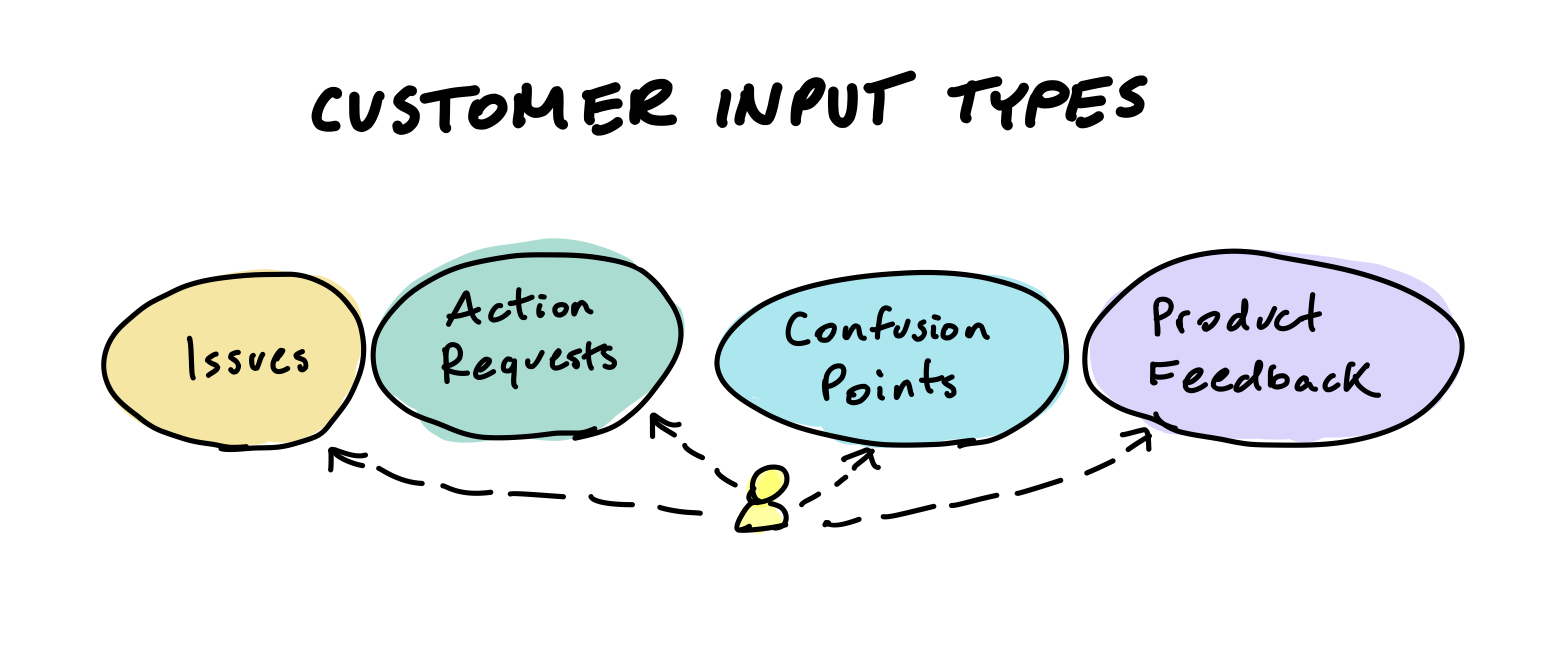
Customer input can generally be categorized into four types:
- Issue Reports
- Defects in the product (a.k.a bugs) that impact the customer’s experience. These are cases where the product doesn’t work as it was intended or designed to.
- Product Feedback and Requests
- This includes positive and negative feedback as well as changes or new solutions that customers desire. Product requests generally correspond to an underlying need or problem that isn't being solved for today.
- Action Requests
- A request for an internal action to be taken on the user’s account. Common examples include refunding charges, retrieving or updating information, or resending receipts.
- Confusion Points
- Situations where the customer needs clarification on the product's usage and capabilities.
Note that a single request can sometimes overlap with multiple types. For example, a user may suggest a feature, unaware that their problem can be solved with existing functionality (confusion point). Or they might encounter an issue, that then requires an action be taken on their account.
A complete customer feedback system will have corresponding workflows designed to not only handle each of these request types, but channel the underlying feedback back to the development team.
Using Customer Input
Product Feedback and Requests
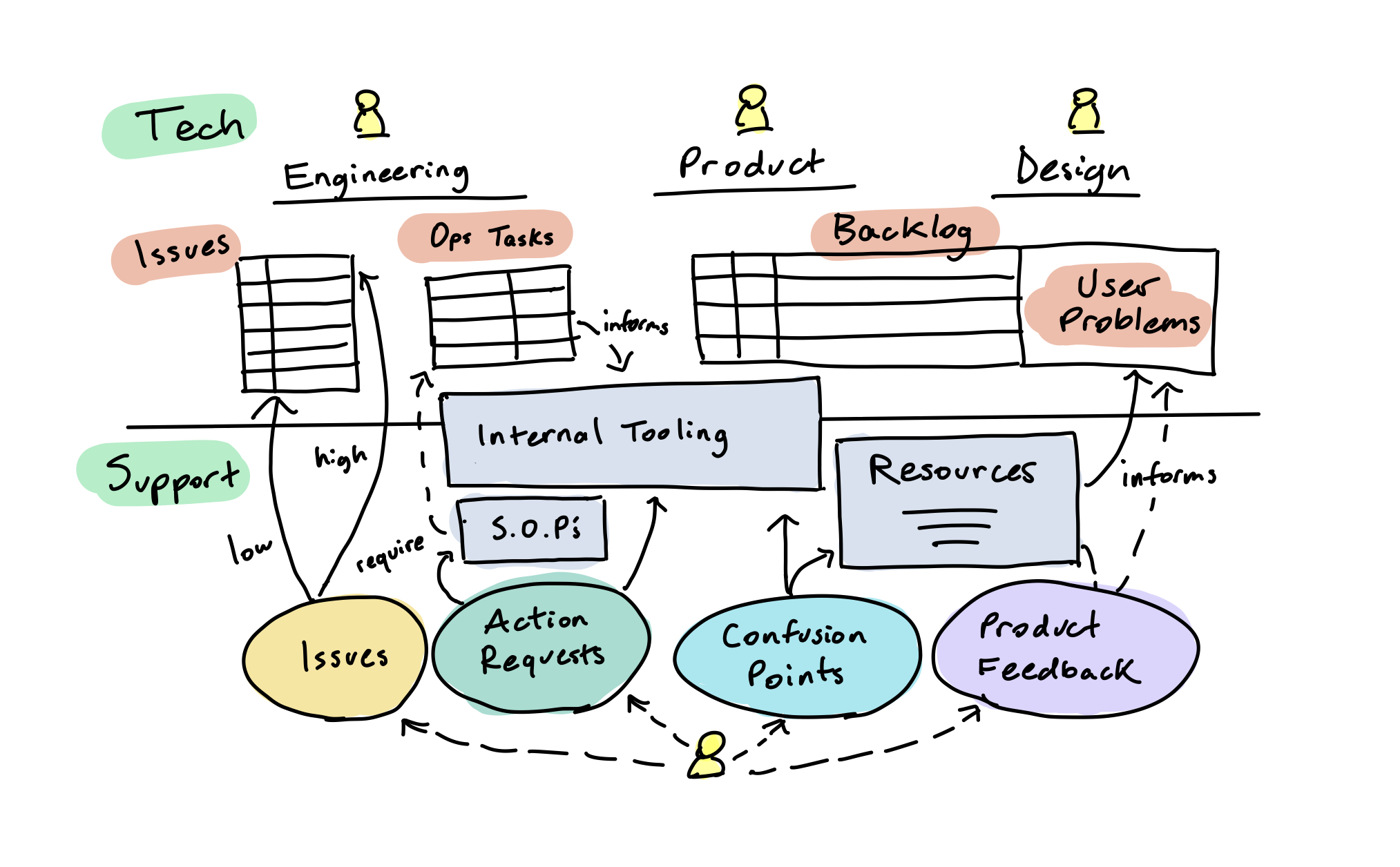
Direct feedback and feature requests are the most obvious type of inputs to collect. Linking these requests to an internal work unit, such as a backlog item or user problem, allows teams to track user needs and collect supporting examples. How to effectively use this feedback is its own product topic, but my personal guidance is that requests indicate problems to be solved (not features to be built), and request quantity doesn't always dictate strategic priority. The relevant point here is that this input should be channeled to those designing the product, so that it can be leveraged in shaping the future version.
Issue Reports
Teams that value the customer experience take technical defects seriously and recognize that each has a cost on user trust. Issue reports are therefore usually higher urgency and need to be routed to the engineering team. An escalation protocol should be established so that high priority issues receive appropriate attention, while lower priority issues are accounted for without undue disruption to core product development. Note that a portion of issue reports are often actually confusion points and should ideally be triaged by the support team.
An internal task should be opened for each technical issue, and all relevant tickets linked to it. Associating each customer ticket to an internally tracked item aggregates cases and centralizes communications in both directions. Each ticket gives engineers an example to look into while investigating the issue, and any updates or mitigation steps that the technical team finds can be communicated on the task and relayed back to customers encountering the problem.
Action Requests
Requests that require an internal action should be associated to a corresponding playbook (SOP). Establishing this practice ensures that these procedures are actually defined and kept up to date, and the linked tickets can also serve as example resources for handling future cases of the same type.
Sometimes fulfilling user requests requires support from the engineering team (e.g changing a database value for the customer). Tracking this work unit informs the tech team on the cost of operations, and can help point to potential areas for tech investment.
Investment here might entail building features into the product to allow customers to perform certain actions themselves, or building internal tooling to allow team members to handle requests without needing engineering support. The increased operational efficiency impacts the user experience directly both through support time and in resources freed for further product development.
Confusion Points
Requests that fall into the category of general confusion points are the most common and also the most underrated in terms of their value to product development, in my opinion.
On the support side, each of these tickets should be linked to an an existing or newly created resource documentation item, which helps the team standardize external responses and build a knowledge base over time.
This practices also serves to highlight product areas that are giving customers the most trouble, and these customer insights should be regularly aggregated and shared with those designing the product. Having the product team (designers, copywriters, product managers, engineers, etc) periodically read or handle tickets can short-circuit this communication path, and helps build true customer empathy.
While customer confusion points may not cause error messages, they’re still an indication of how a product falls short in meeting user needs. Product-oriented teams know this and take ownership of this form of feedback, working to build a product experience that delivers value in a way that's clear for users to understand.
System Improvements
We've outlined a general structure for our feedback system, but all systems evolve as they are put into practice, ideally getting more efficient over time. There are two main ways to lower the relevant customer support costs to the business: reducing the number of tickets created, and lowering the cost to addressing each one. A user-centric tech team can contribute to both of these initiatives.
Building better products reduces support costs
The best way to lower support costs is to prevent customer requests from being created in the first place. The most effective way to do this? Building a better product, by being customer-oriented! When you listen to customers, address their issues, build solutions to their problems, and refine your product’s design to reduce confusion, you’ll not only increase the product’s value but also reduce the volume of inbound customer requests. Integrating a well-designed customer feedback system into the product development cycle decreases the per-user cost of support over time.
Pre-empt inbound by building shared internal resources
A key to getting more efficient in the area of support is preparation: establishing procedures and organizing team knowledge before it’s needed. The outlined system of attaching tickets to internal work units (playbooks, resources, backlog items) inherently promotes building an internal knowledge base by bootstrapping it with previously handled customer tickets. Support teams can also use these to create shared template responses for communications on customer confusion points.
The product team contributes in this area by working with support to prepare support material and training before new product launches, anticipating potential user inbound. This could mean sharing known issues and workarounds, or potentially complex user flows. Establishing tight team synchronization here can actually enable more nimbleness in product development, as trust in strong support capability can be leveraged in product trade-offs and decision making.
Front-load product resources for users
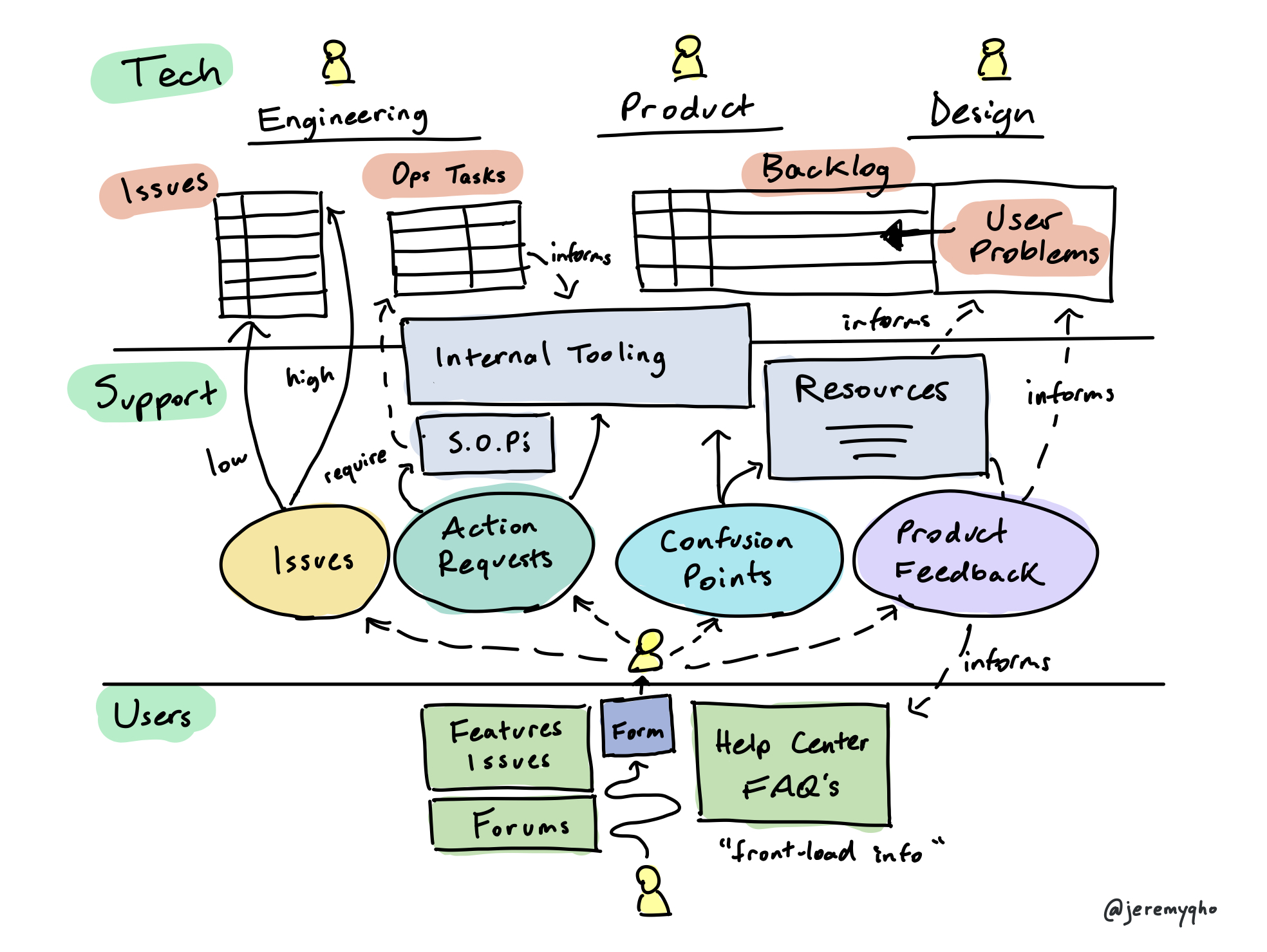
Another strategy for improving customer feedback efficiency is to progressively move support to the front of the system by helping users help themselves without needing to contact a team member. This generally involves maintaining and promoting an external resource center (leveraging the internal knowledge base), and directing users to it before they submit requests.
Some of the initial routing work involved in handling customer requests can also be front-loaded through intentional design of the interface users use to submit requests - i.e a form with questions to funnel requests by type and collect or give relevant information. The tradeoff is in putting more work on the user, but if it leads to them getting their questions or issues resolved faster, its often a better outcome for everyone.
While this technique is commonly used to address confusion points, it can also be used for issue reports and feature requests. Maintaining a public forum where users can search known issues and feature requests allows for the crowd-sourcing and self-organization of requests, tips, and resources from the user-base - which can reduce operational load on support. The open-source world serves as a great example here, as Github hosts public documentation and an open forum for user requests and issues in every project by default.
If teams dedicate effort to curating these forums, they can be a great way to collect user input while front-loading information to reduce support costs. The key with this method remains the same: defining processes so that feedback from this input channel funnels back into product development.
Closing the loop
While the main value of using customer feedback is that it helps you build a quality product that customers love, there’s another type that’s commonly overlooked: letting customers know they’ve been heard.
If customers give you feedback and you use it, tell them! Teams that don't do this are basically leaving free money on the table. A benefit of the outlined framework is that it makes it easy to add a personal touch in these cases. For example, while building a B2B product I’d ask our sales team to attach customer requests to feature backlog items. When a requested feature was eventually built and launched, it was easy to round up all the interested customers and call them up with the good news. If you’re setting up a strong product feedback loop with your customers, make sure to leverage the communication benefits in both directions!
Concluding
I hope that this framework has offered some helpful insights on designing customer feedback systems. A final thought - while this overview was focused on tactically leveraging inbound feedback, teams that really value their customer's input will go a step further with proactive user outreach. This entails incorporating customer feedback into the flow of a product's experience, in addition to its development. While practiced through team processes, being truly customer oriented goes beyond tactics. It's a mindset for creating great products.